Journals
Announcements
- Have you tried the Lean Library browser extension? It provides quick and simple access to Library-subscribed full-text content. Learn more about Lean Library and try it out!
- Get seamless access to articles with LibKey Nomad! We’re piloting LibKey Nomad through the end of 2026. It's a browser extension that instantly connects you to library full text as you browse the web. On publisher sites, PubMed, and more, you’ll see convenient "Download PDF" and "Article Link" buttons whenever access is available. Install it and let us know what you think.
Healey Library provides access to over 100,000 journal, newspaper, and magazine titles. Depending on your needs, you can search and browse our journal holdings by using the following tools:
-
Journal Finder: Search all of Healey Library's print and electronic journal holdings by title, keyword, or ISSN
-
UMBrella Advanced Search: Use UMBrella filters to refine your search results
-
BrowZine: Use this scholarly journal reading and browsing tool to stay up-to-date on journals you read regularly
Journal Finder
Journal Finder is integrated directly into the UMBrella search interface, allowing for a consistent search experience. Journal Finder also allows users to search Healey Library’s complete periodical holdings, including print, electronic, and microform titles, from a single search interface.

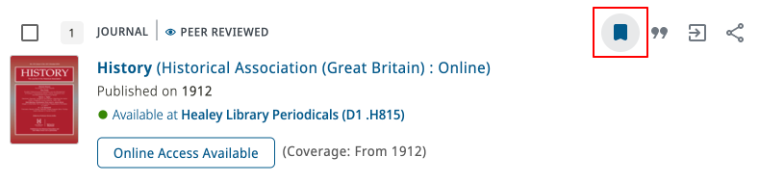
Use the Save Record icon next to each journal title to save journals to your bookshelf for easy access to these bookmarks from any computer. (Note: Please sign into UMBrella first using your UMass Boston username and password before saving items to your bookshelf.)
Other Options for Journal Searching
In addition to the UMBrella Journal Finder, users may search or browse Healey Library’s periodical holdings through UMBrella, Healey Library's one-stop search, discovery, and research management portal, or BrowZine, an app for browsing and saving scholarly journals.
UMBrella Advanced Search
Pros and Cons of UMBrella Advanced Search
- Pros:
- More precise search capabilities
- Search by subject or discipline
- Limit your results by format (print or electronic)
- Use UMBrella filters to refine your search
- Cons:
- The breadth of a full UMBrella search can return an overwhelming list of results
- Results in this search may include titles to which Healey Library does not fully subscribe and that you would need to request through interlibrary loan
- TIP: Use the "Full Text Available" search filter to limit your results only to titles subscribed by Healey Library
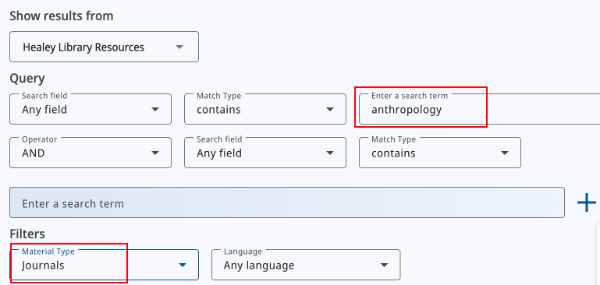
Users looking for more precision searching for journals may use UMBrella’s advanced search:

From the advanced search, enter your desired keywords and select “Journals” from the pull-down menu under “Material Type” and click “Search”:
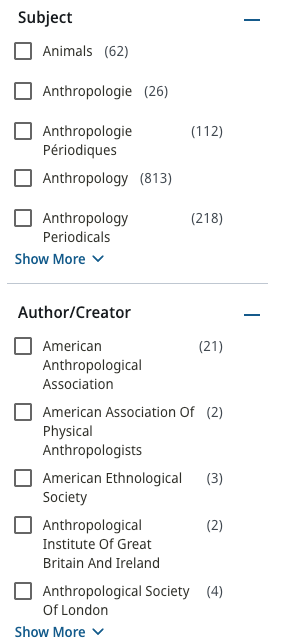
From the search results screen, you can use UMBrella’s search filters to limit your search, such as by subject or author/creator:
BrowZine: A Scholarly Journal Browsing Tool
Pros and Cons of BrowZine
- Pros: Browse journals by discipline from a mobile-friendly interface and app
- Cons:
- No newspapers and magazine titles are available in BrowZine - only scholarly journals
- TIP: Newspaper and magazine articles are included in UMBrella searches, if you are looking for more than scholarly journal articles
Users looking to browse and read scholarly journals specifically may want to try BrowZine, which allows readers to browse scholarly journals by discipline, save titles to their bookshelves for easy bookmarking, and read scholarly journals easily on mobile devices through the BrowZine app.
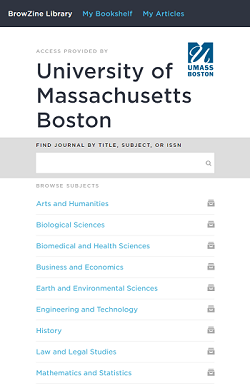
For more information about BrowZine, check out Healey Library’s BrowZine research guide.
Healey Library
100 Morrissey Blvd.
Boston, MA 02125 US
617.287.5900